



When I wind down at night, I sleep better, But I often forget to, I get stressed about tomorrow, and end up sleeping worse because of it.
The Hatch Restore has a ton of features that completely solve these issues.
In this review, we’ll be reviewing version 2 of the Restore as well as the new 3rd update. We’ll also test their total brightness, lux, sunrise curves, and much more!
If you’re on the hunt, check out our best sunrise alarm clock list! →
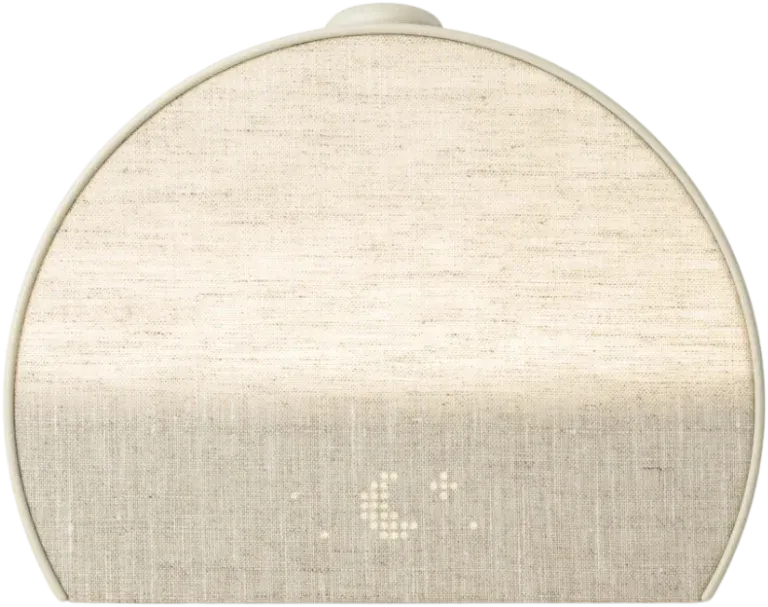
My verdict
Hatch Restore 3
This is hands down the best bedtime ritual/wind-down machine on the planet. I was super impressed with the app's polish and ease of use. The sunrise effect and adjustability are also pretty decent and bright enough to be effective. If you'd like a sunrise alarm clock but also love the idea of improving your nighttime routine, this is a great buy for the price.
- Pro: The app and routine builder are very well done
- Pro: Looks great on the nightstand, unlike many other clocks!
- Pro: The sunrise is powerful enough to be effective
- Pro: The light is fairly flicker-free!
- Con: The sunrise light is a bit dim compared to other options
- Con: The full sound and light library needs Hatch+ ($5.99/mo)
The Hatch Restore 2
The Hatch Restore is essentially a sunrise alarm clock that doubles as a bedtime/morning routine creator.
Free · 95 pages
You're reading about one piece of this. The book is the whole day.
The Circadian Blueprint covers setting your body clock with light — the timing, the doses, and which products actually deliver them. Every number came off my own spectrometer.
First of all, I think this thing is gorgeous (I like industrial design):

The Restore also comes in three colors, I got the Putty version.

And it looks great on a nightstand!

It comes with a cute little fold-out instruction manual that walks you through the physical controls:

The two buttons on the top, Rest and Rise allow you to easily start, stop, and fast forward through your chosen routines (more on that later).

Tapping above or below the clock face will change the brightness of whatever light is being displayed, while tapping on the left or right will change the volume.

And that’s pretty much it for the actual physical controls!
The Hatch Restore 3
The new Restore 3 looks and functions basically the same as its predecessor:

The biggest change is the new physical controls, although it is also brighter overall than version 2.
On top of the Restore 3, you’ll find a knob, and two buttons to either side of it.

Overall, I prefer the new controls; it’s an improvement, but there is one downside, which I’ll go over in just a bit.
Here’s how the controls work:
Volume is now controlled by turning the knob instead of tapping on the clock face; I like this change. Tapping the knob will also begin your routine, tapping it again will jump to the next part of your routine, and a long press will stop the routine.
The button with the pause icon will pause whatever is playing, while the three dots button will switch between your three main sleep routines in case you want to switch it up without your phone. This, again, is a great, change as before you’d have to open the hatch app to swap to one of your other routines.
In the morning, tapping the knob will snooze the audible alarm, but not the light! Long pressing it will turn off everything.
The Downside: You can no longer adjust brightness without the app, whereas on version 2 you could do this by tapping above or below the clock face.
The Subscription Model
Hatch+ costs $5.99 per month or $59.99 per year (about $5 per month). Custom routines and the sunrise alarm are now free; Hatch+ adds the bigger content library (100+ wind-down audio tracks, 80+ sleep and alarm sounds, and 100+ light scenes).


Now some people throw up at the sight of another subscription, but you don’t need it for the core features: the routine builder and the sunrise alarm are free. I thought the routine builder was super well done and I enjoyed using it. Hatch+ only adds the bigger library of sounds, guided audio and light scenes, and Hatch keeps adding to it, so it’s worth the cost only if you’ll actually use that content.
Plus I think there’s this element of “I’m paying for this so I better use it” that can help you stick to your routine and take your sleep more seriously.
Plus it comes with a free month so you can try it out and see if you like it!
Exploring the App
Given all the subscription model hate online, I was expecting to dislike this product.
But wow, this app blew me away! It feels like the perfect combination of settings and features, and they’re all executed well.

It feels like I made it. So let’s see what it’s all about.
Clock and Display Settings
This may seem like a boring place to start… but there was even some nice thought put into this!
You can do things like change the daytime or nighttime clock face brightness or even have it turn off completely at night. If you have the clock face off at night, you can tap the clock to turn it back on temporarily.
OR, if you know you’re the type to stress out over what time it is when you wake up in the middle of the night, you can strategically turn this feature off, so you can’t be tempted to find out!

Let’s get into the real meat though…
App Homepage
On the homepage, you’ll find several things arranged in order.
- Cue to Unwind
- Unwind
- Sleep
- Sunrise Alarm
- Morning Moment

These might seem overwhelming and confusing at first but they’re not. Let’s start from the top and work our way down.
Cue to Unwind
The cue is essentially a light and sound combo that reminds you it’s time to chill the F out and get ready for bed. You probably need this, we all do.
Stop doom scrolling, stop checking your email, turn off the TV, stop working on your stressful side project (me cough cough), and go chill out.

Read a book, make some tea, stretch, meditate, journal, you know.
You can set the volume for this high so you hear it outside of your bedroom, and then just turn it down once you need to.
Unwind
The Unwind section lets you create 3 routines, which can be started anytime by pressing the Rest button on top of the clock.
There are premade routines you can choose from (and edit) or you can make your own!

These “routines” are a series of “steps”. These include meditations, short fictional stories, little podcasts, narrative adventures, classical music, lo-fi, nature soundscapes, ASMR, etc.
There are many options to choose from, and several of them “randomize” daily. Hatch is also constantly adding more content to the selection as well.


For example. When writing this article, “It’s Crime for Bed” has over 140 tracks, meaning it would take you over 4 months before you heard a repeat! And by then, there would be more.

Customizing the Steps
Now, each step has its own set of customizations.
You can change the volume and length of the step. However, some steps are hardcoded to their times, such as the Its Crime for Bed episodes, which are always about 17 minutes long.

Many come with their own special dynamic “light pairing,” such as the blood orange sunset lighting found in the It’s Crime for Bed episodes. Of course, you can change this to any other lighting you’d like.
The lighting options are:
- Sunsets
- Solid
- Dynamic

There are many options that allow you to dial in a routine that feels unique and special to your tastes and moods.
Putting it All Together
The power of the Hatch routine builder shines once you build one specific to you.
Let me give you an example:
Imagine you’re preparing for bed with a calming 20-minute yoga or stretching session. Afterward, as you get into bed, you’ll listen to a relaxing story to wind down. Once the story ends, you’ll transition into a peaceful 5-minute meditation. Finally, you’ll drift off to the soothing sounds of nature, which will gradually fade out, helping you fall into a deep, restful sleep.
That sounds pretty nice, I think! And the best part is that once you have this setup, you just press the button and go. The audio and light cues help you focus on what you should be doing.
Here’s what that looks like:

I quite like history, so I went with the history stories 😀
Sleep
After your routine finishes, you can turn on a “sleep” function.
This essentially plays ambient white noise for a specified amount of time or until you tap the rest button again.

I think it’s pretty cool that the Unwind routine can transition straight into white noise if you want that. If you’re curious, we’ve recorded all of the options for you to preview here:
- 432 Hz Ambience
- Brown Noise for Dogs
- Brown Noise
- Calming Singing Bowls
- Cozy Campfire
- Dishwasher
- Dryer
- Evening Crickets
- Fan
- Forest Symphony
- Forest Wind
- Green Noise for Dogs
- Green Noise
- Hair Dryer
- Night Rain
- Owl Calls
- Pink Noise
- Rainstorm
- Relaxing River
- Road trip
- Sleepy Ambience
- Stormy Sea
- Thunderstorm
- Train Ride
- Tranquil Ocean
- Vacuum
- Waterfall
- White Noise
And up next, we finally have the sunrise feature!
Sunrise
You can select from 11 different sunrise effects and various kinds of audible alarms for the sunrise.

Here is where you select your sunrise:

The actual sunrise itself can be customized for time, day, total brightness, and duration:

There are quite a few audible alarm options. I tend to avoid these on sunrise alarm clocks, but you may want them, so we’ve recorded the sounds for you to preview here if you’d like 🙂
- Acoustic Morning
- Aloke's Sitar
- Ambient Sunshine
- Bei Bei's Guzheng
- Breakfast
- Church Bells
- Cityscape
- Fabiola's Cuarto
- Forest Birds
- Get Up and Slay
- Gilmore Girls
- Hamed's Santur
- Jaida Clears Her Mind
- Jaida is Fun and Fabulous
- Jaida Manifests the Best
- Jaida Takes A Deep Breath
- Jaida's the Queen of Routine
- Joyful Morning
- Lofi Beats
- Meditative Flute
- Meditative Flute
- Morning Bird
- Morning Singing Bowl
- Ocean Shore
- rest-spresso
- Retro Beep
- Salieu's Kora
- Thank God It's Monday
- Wake Up
- Windchimes
Morning Moment
Now after you wake up and turn off the sunrise, you can set up your morning moment, which is kind of the opposite of an evening routine.

Again, it’s a little thing, but I liked this additional feature. Here’s what the detailed selection screen looked like for both of these options:


There are more meditations, music, and some of Jaida Hall’s motivations if that’s your thing (it certainly wasn’t mine).

But overall, the Morning Moment is a nice touch to round out the Hatch Restore 2’s routine features.
Testing the Hatch Restore
Of course, we put the Hatch Restore 2 & 3 through our usual in-depth light testing; let’s dive in!
Total Light Output
We started by placing the Restore inside our integration sphere. This allows us to measure lumens or total light output as well as the ramp-up for each sunrise to see which ones we like best!

Since the Restore has many different sunrises, we wanted to see if some were better than the rest.
This is the kind of sunrise ramp-up we like to see, a gradual logarithmic increase:
Output by time. Twilight ramp length 25 min.
See the numbers
Twilight
- Ramp length
- 25 min
And here are all of the Restore 2’s sunrises over 30 minutes or so:
As you can see, many of them are odd. Tropical Morning starts quite quickly, not so good. Conquering Fuji just never gets very bright, so it’s useless. Morning Stroll has a slow build-up and then a very sudden increase, not ideal. Same with Portland Lighthouse after it dips.
In my opinion, the best sunrise effect comes from Morning in Prague. The ramp is best with this one, and it’s also one of the brightest.
Here’s a video showing what the sunrise effect looks like.
Now the Restore 3 is about 30 percent brighter overall which is great, and includes a few extra sunrises:
- Flowering Orchard
Chart by x. Flowering Orchard.
- Conquering Fuji
Chart by x. Conquering Fuji.
- Pumpkin Spice Latte
Chart by x. Pumpkin Spice Latte.
- Hiking in the Dawn
Chart by x. Hiking in the Dawn.
- Malibu Sunrise
Chart by x. Malibu Sunrise.
- Morning in Praque
Chart by x. Morning in Praque.
- Morning Stroll
Chart by x. Morning Stroll.
- Nordic Sunrise
Chart by x. Nordic Sunrise.
- Portland Lighthouse
Chart by x. Portland Lighthouse.
- Tropical Morning
Chart by x. Tropical Morning.
- Spring Sunrise
Chart by x. Spring Sunrise.
- Snow Day
Chart by x. Snow Day.
- Resolution
Chart by x. Resolution.
- Rainbow Rise
Chart by x. Rainbow Rise.
- Circadian Rise
Chart by time. Circadian Rise.
See the numbers
| Ramp length | |
|---|---|
| Flowering Orchard | 29 min |
| Conquering Fuji | 29 min |
| Pumpkin Spice Latte | 29 min |
| Hiking in the Dawn | 29 min |
| Malibu Sunrise | 29 min |
| Morning in Praque | 29 min |
| Morning Stroll | 29 min |
| Nordic Sunrise | 29 min |
| Portland Lighthouse | 29 min |
| Tropical Morning | 29 min |
| Spring Sunrise | 29 min |
| Snow Day | 29 min |
| Resolution | 29 min |
| Rainbow Rise | 29 min |
| Circadian Rise | 29 min |
The sunrises are very similar, though; for example, Morning in Prague is still one of the best curves.
All told this isn’t the brightest sunrise alarm clock we’ve tested, but it’s certainly bright enough directionally, which we’ll go over next.
Lux Measurements
Since what’s important is the lux, let’s look at that next. I recommend starting your sunrise at around 250 lux, which can be achieved with the Restore.

Let’s look at the lux data from Morning in Prague since that’s our favorite sunrise:


As you can see the Hatch Restore 3 is definitely the brighter model, and hits that 250 lux threshold at 18 inches.
Flicker Testing
For those concerned with light flicker, the Restore performs quite well here!

Both the Restore 2 and 3 had very minimal flicker:
A flat line at the top means steady light; dips mean flicker.
Light output by time. Full brightness · Hatch Restore flicker (graph data #35795) percent flicker ; Full brightness · Hatch Restore flicker (graph data #35795) frequency ; Full brightness · Hatch Restore flicker (graph data #35795) ieee 1789 ; 50% · Hatch Restore flicker (graph data #35795) percent flicker ; 50% · Hatch Restore flicker (graph data #35795) frequency ; 50% · Hatch Restore flicker (graph data #35795) ieee 1789 .
See the numbers
Full brightness · Hatch Restore flicker (graph data #35795)
- Percent flickerHow far the light dips from its brightest, as a share of the total. Under 1% is steady to the eye.
- Not measured
- Frequency
- Not measured
- IEEE 1789The flicker safety guidance for lighting: how deep the flicker is, for its frequency.
- Not measured
50% · Hatch Restore flicker (graph data #35795)
- Percent flickerHow far the light dips from its brightest, as a share of the total. Under 1% is steady to the eye.
- Not measured
- Frequency
- Not measured
- IEEE 1789The flicker safety guidance for lighting: how deep the flicker is, for its frequency.
- Not measured
Overall Thoughts and Impressions
I’m pleasantly surprised with how much I enjoyed using the Hatch Restore!
Hatch+ is optional now: routines and the sunrise alarm are free, and even without the subscription it’s a very user-friendly sunrise alarm clock with scheduling and white noise features.
It’s also hands down one of the best-looking sunrise clocks out there if that’s important to you! If you like the look but not the price, I measured the cheaper Dreamegg Sunrise 1 against it: under a quarter of the light.
The Restore 3 is brighter than 2 and features what I think are new and improved controls (other than brightness adjustments), but if you’d like control over the brightness or don’t mind having less control over your routines, the Restore 2 is still a great choice.
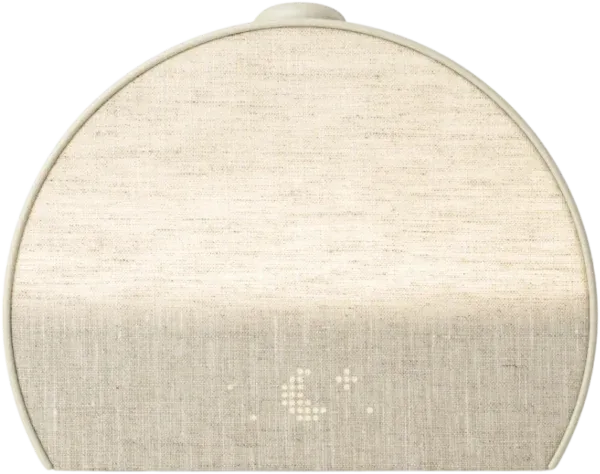
Hatch Restore 3
Solid upgrade over the previous model: brighter output, an excellent app and routine builder, an actually attractive nightstand design, an effective sunrise, and largely flicker-free light. Trade-offs stack up though — sunrise is dimmer than top picks, the full sound and light library sits behind a subscription, brightness adjustment is clunkier than the Restore 2, and it emits EMF if that's a concern for you.
Keep reading
 Sunrise Alarms
Dreamegg Sunrise 1 Review: Hatch Looks, Under a Quarter of the Light
 Sunrise Alarms
Rise Centered Sunrise Alarm Clock Review: Gorgeous, and Dimmer Than You Think
 Sunrise Alarms
Casper Glow Light Review: Great Night Light, Weak Alarm?
 Sunrise Alarms